We planted typos: four OCR engines, 16 images with text
We made 20 test images. 12 generated ones with a brand name on them, most with a typo planted on purpose: two letters swapped, one letter doubled. Plus 8 real product photos. 16 of the 20 have text on them.
Four engines had to transcribe that text exactly, with a prompt that says, in capital letters, not to correct anything.
Gemma 4, a small vision model that runs for free on a laptop, got 11 of 16. In 4 cases it returned the brand name spelled correctly, although the image showed the typo. It didn't misread those images. It fixed them. Those four bugs would have shipped.
Why vision language models correct typos
Vision language models are trained to be helpful. They predict the most likely text for what they see and a famous name spelled right is far more likely than the same name with two letters swapped. The better the model knows the word, the harder it pulls toward the right spelling.
Classic OCR has no idea what a brand is. It only knows the shapes of letters, so it reports what's in the pixels, mistake included. For describing a picture, that's a weakness. For a spelling check, it's the whole point. A helpful OCR is a broken OCR.
Classic OCR plus an exact match against the brief
Boring OCR reads. Its text gets compared with the brief, letter by letter. A match goes out. A mismatch goes back and gets generated again. The vision model still has a job, layout and context, but it never gets the last word on spelling. When it disagrees, a person looks.
For the record: PaddleOCR got 15 of 16 and invented nothing. Apple Vision got 13 of 16 and invented nothing. Claude Opus 4.7 got 15 of 16 and still invented one. The decade-old boring tech didn't lie once.
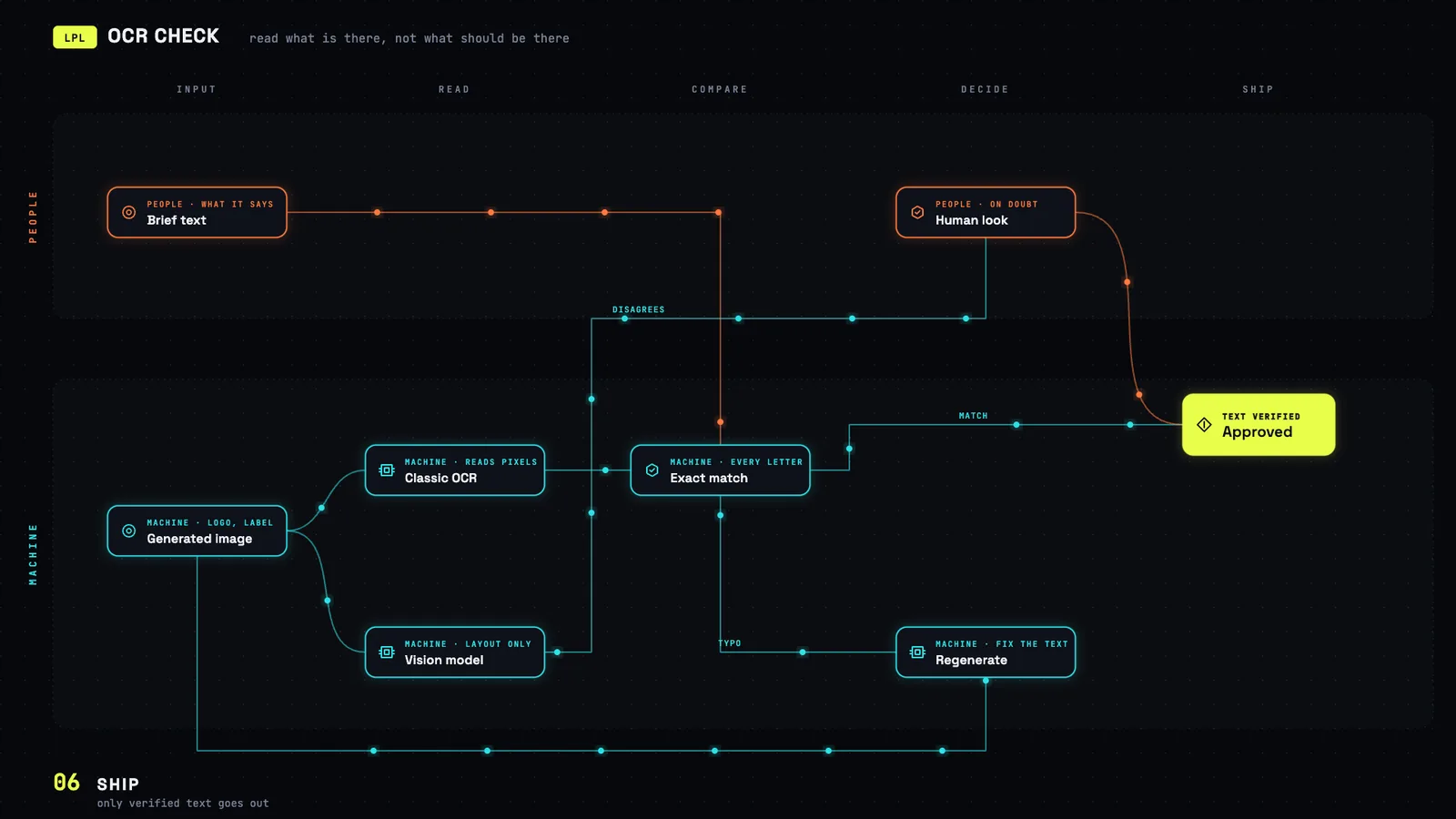 Full size ↗
If you have to use a vision model for reading, this is the prompt from our test. It helps. It is not enough:
You are a strict OCR engine. Transcribe EVERY visible text string in this image exactly as it appears, character by character. Do not correct any spelling. Do not interpret. If text is misspelled, output it misspelled. Return ONLY a JSON object: {"texts": ["string1", "string2", ...]}. If no text is visible, return {"texts": []}.And the classic OCR we use instead. Free, local, a few lines of Python:
# pip install paddleocr   (first run downloads the models)
from paddleocr import PaddleOCR

ocr = PaddleOCR(use_textline_orientation=True, lang="en")
for page in ocr.predict("image.png"):
    print(page["rec_texts"])   # exactly what is in the pixels, typos included
Checking text on generated images: our rule of thumb
If a generated product shot, label or ad has text on it, someone has to check that text. Checking it with the same kind of model that made the mistake is the trap. It sees what should be there. You want something that only sees what is there.
Our rule of thumb now:
- Reading the pixels: classic OCR.
- Checking against the truth: the brief, letter by letter.
- Vision models: describing, sorting, layout. Not reading.
16 images is a small test, so take the numbers as a direction, not a benchmark. It was clear enough for us to change our own QA layer.