What goes in
One shop URL. No login, no export, no access to your backend.
To keep this honest we ran it on Shopify's own demo store for its default theme. No real merchant gets audited, and anyone can check our numbers.
The steps
The scan finds every product, opens every product page and pulls out the images and the text.
Images get sorted by cheap pixel rules first: a studio shot on a plain background, or a lifestyle shot with the product in use. A vision model only looks at the ones the rules aren't sure about. The text gets scored for length and structure. Every product gets a score, the shop gets a report.
Where the QA sits
Rules are fast and cheap. They're also wrong sometimes.
In this run they flagged 19 of 139 images as placeholders. They weren't. They were real product photos on a very plain background. That's why a person reads every report before a client does, and why unsure images go to the vision model. This run was rules only, so the 19 stayed in the report, and we left them out of every number below.
What comes out
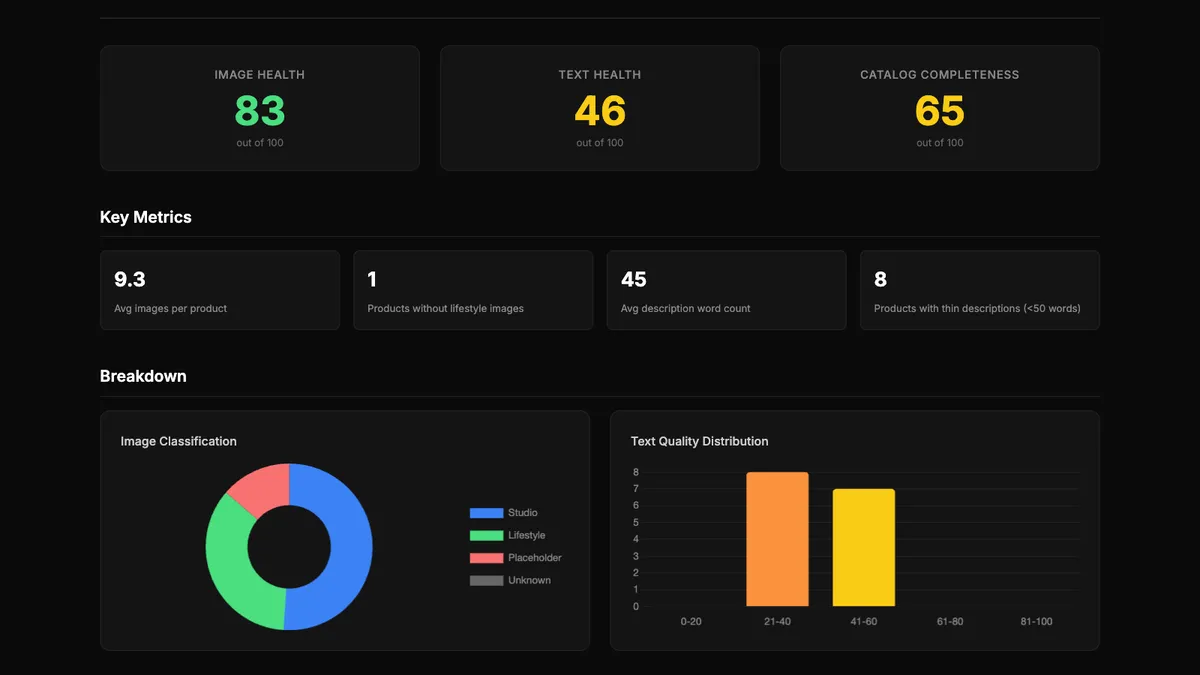
15 products, 139 images, 23 seconds.
Image health 83 out of 100, text health 46, completeness 65. One product had no photo of it in use. 8 of the 15 descriptions were under 50 words, and not one used bullet points. The weakest product: eight photos, all studio, and a 45-word description.
Why it matters for your team
You rarely see a shop's gaps from the home page. Here the photos are strong and the text is thin, so the fix is a copy plan, not a photo shoot.
That's what the report is for: knowing what to fix first, and what kind of fix it needs, before anyone spends money on content.
We run this scan as part of the Process X-ray. Process X-ray →