One real sneaker and a fact sheet of 17 points
The shoe is a purple mid-top sneaker from a big sports brand. I own a pair. That matters: every count in this post was checked against the real shoe, not against what I remembered it looked like.
The target was a picture a shop or a campaign would actually use: a person wearing the pair, a close side view, golden hour on a city street. The references were the brand's own product photos from nine angles. They stayed on our machine and are not in this post. Every image you see here is generated.
Before generating anything we wrote the shoe down as a fact sheet: every part a buyer could check and where it sits relative to another part. Which side each logo is on. Five lace stations per side. 15 holes in the side panel, in rows of 5, 6 and 4 from the top. Nine raised dots on the heel cage. The exact text on the round badge. 17 points in the end.
The judging rule was strict. A person compares each part on a tight crop next to the same part of the real shoe. A part that is hidden or too blurry to read counts as unsure, never as a pass. Models help find the places to look, but they don't get the final call.
Round one: the logo on the tongue, the side logo gone
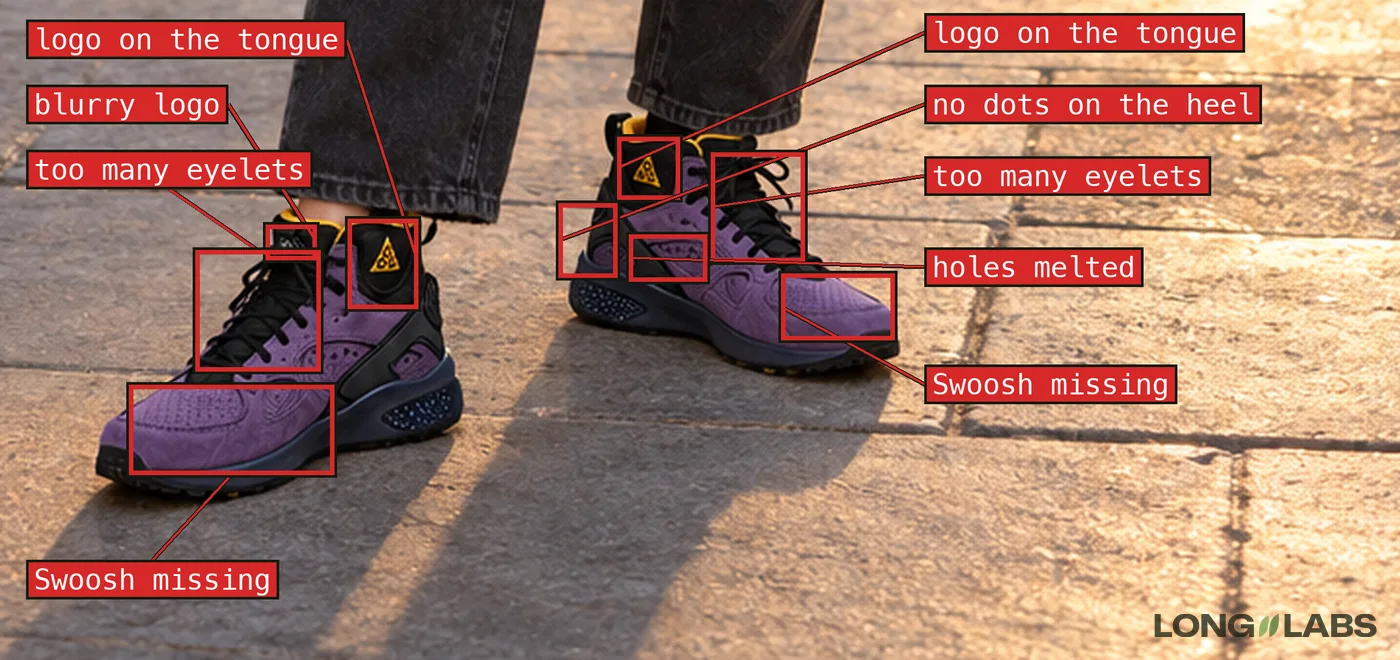
Round one used three product photos and a vague prompt: these sneakers, realistic. At full size the result looked great. Then we zoomed in.
The triangle logo, which sits on its own patch on the ankle collar, had moved onto the tongue. The small logo on the outer forefoot was gone on both shoes. The flat pull tabs had turned into rope loops, the round badge said nothing in any language and there were too many eyelets. 7 of 13 visible checks passed.
None of that shows in a thumbnail. All of it shows to anyone who owns the shoe. Those are the people most likely to buy it.
 Full size ↗
Five rounds from 7 of 13 to 15 of 15 checks
Every round changed what went in, not just the wording of the prompt.
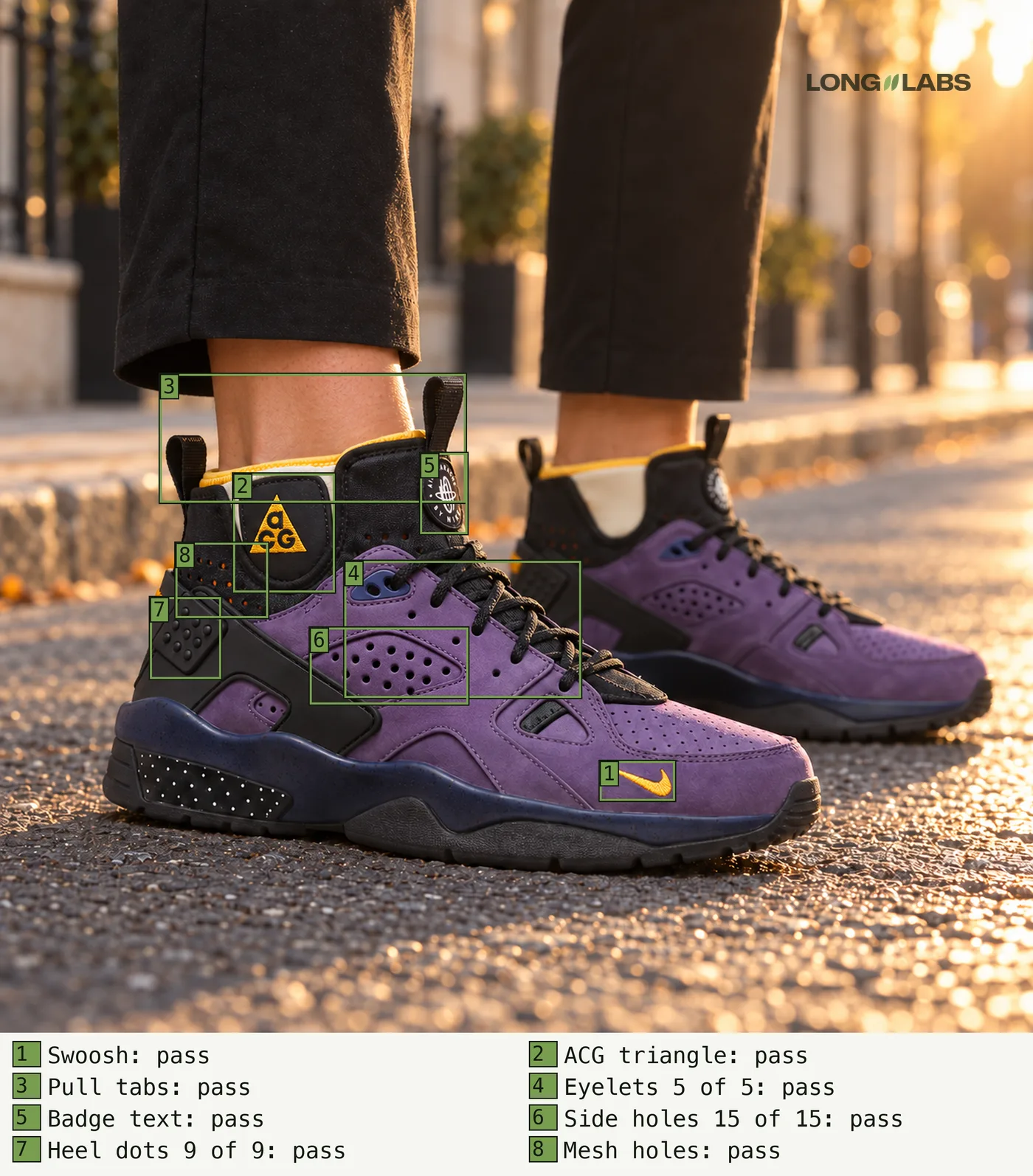
Round two described every part in words, still from three photos. It looked better at a glance and was still wrong on the tabs and the badge, because three photos without a straight side view can't show where things sit. Round three added six angles and the fact sheet. Every logo landed on the right part in one go. Round four added eight close-up crops of the details and the counts came right: 5, 15 and 9. What was left was small and stubborn: the badge text, the letters in the triangle logo and the order of the holes in their rows.
Round five started with an audit of our own inputs. We redid the crops from sharper source images, mirrored the ones that faced the wrong way and corrected two facts in our own sheet. Then the fixes went one at a time, each on a crop at four times the size and put back into the full image: the letters, then the badge, then one missing hole.
 Full size ↗
What went wrong on our side
Not every fix worked and some of the mistakes were ours.
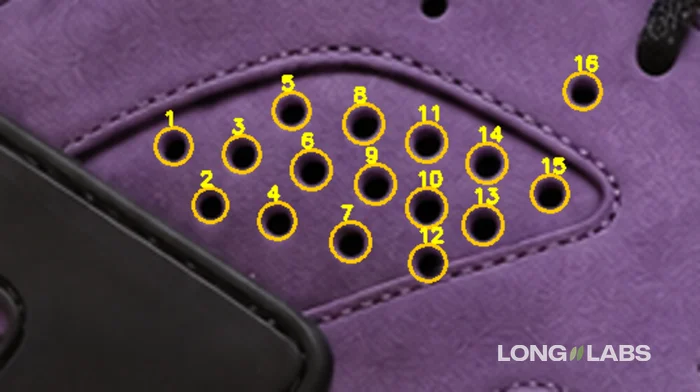
The first whole-image edit of the side panel gave 12 holes instead of 15. The reference photo faced the other way, so the model copied a mirrored panel. Mirroring the reference gave 14 holes in rows of 5, 6 and 3. Asking it to copy 5, 6 and 4 on a crop gave 5, 5 and 4 once and 5, 6 and 3 the next time. What finally worked was the smallest possible ask: add one hole to the bottom row. Even then one hole had to be cloned by hand, at the row's own spacing.
Our own counting rule was wrong too. An early check reported 8 eyelets where the shoe has 5, because it counted the small perforations next to the laces. We changed the definition to lace stations: openings a lace actually passes through. And a person still caught what every tool missed: three small holes next to each lace station except the last, the top station inside a navy fitting and one hole that sits outside the side panel.
Why image models get counts and logos wrong
Our hypothesis, not a measured fact: image models learn what a shoe looks like, not its parts list. A purple sneaker with a triangle logo somewhere on the upper looks right to them, because in most photos it would. Where exactly the logo sits, how many holes there are and what the badge says barely change the overall look, so the model has little reason to get them right.
Counts drift most. In our runs they came out one off at five eyelets as well as at fifteen holes, whatever number we wrote. The model generates text as shapes, it doesn't spell it, so a badge comes out as letter-like marks. And it will happily give both shoes of a pair the same side, logos and all, because each one alone looks fine.
Can a vision model do the checking? Not out of the box
Checking every crop by eye is slow, so we tested whether a model could do it. We took eight close-ups of the same framing, broke five of them on purpose (a hole removed, a heel dot removed, the logo letters garbled) and let three methods judge every part.
| Method | Broken parts approved | Correct parts rejected |
|---|---|---|
| One vision model run on the whole image, 17 checks | 6 of 13 (46 percent) | 1 of 30 |
| A model on a tight crop next to the real one, no expected number | 2 of 6 (33 percent) | 0 of 8 |
| A pixel counter, no AI | 0 of 3 | 6 of 13, all heel dots |
Out of the box, the model doesn't see every detail yet. The whole-image check approved almost half of the broken parts: it reported 15 holes after we had removed one and passed garbled logo letters three times. Trusting it alone doesn't work.
What helps is giving it better eyes. Tell it what to expect, part by part, from the fact sheet. Show it a tight crop next to the same crop of the real shoe instead of the whole picture. And put computer vision next to it that simply counts: the pixel counter never approved a broken part. It can't see dots that catch no light, so it rejects good images instead, which is the safe way to be wrong. When the counter and the model disagree, a person looks.
The real test: a campaign shoot and the two shots QA flagged
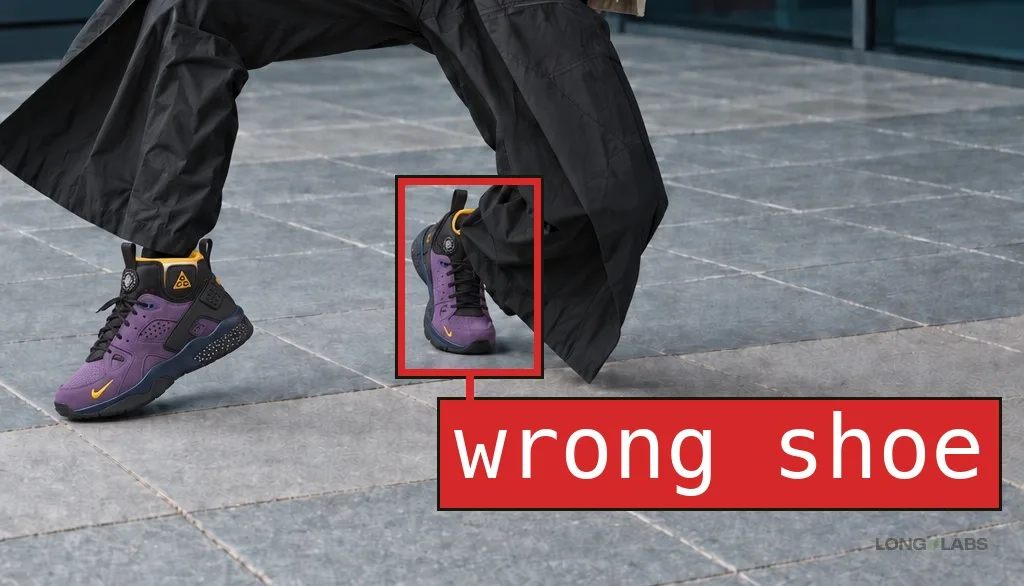
Five rounds on one close-up is a lab result. So we shot a small campaign with the same pair: a person, full body, three poses, the shoe small in the frame. It holds up far better than round one, but two of the three shots still had a logo where the real pair has none.
On the first, the right foot wears a different shoe: the shape of a running shoe, the side logo at the toe of the inner side, more eyelets than five. The check on a close crop of both feet caught it.
The second one is harder to see. Sitting on a bench, both feet point the same way, so the camera sees the outer side of one shoe and the inner side of the other. The real pair carries the triangle logo on the outer collar only. In the image both show it. The check passed it. A person caught it in the last look before anything goes out, which is exactly why that look is there.
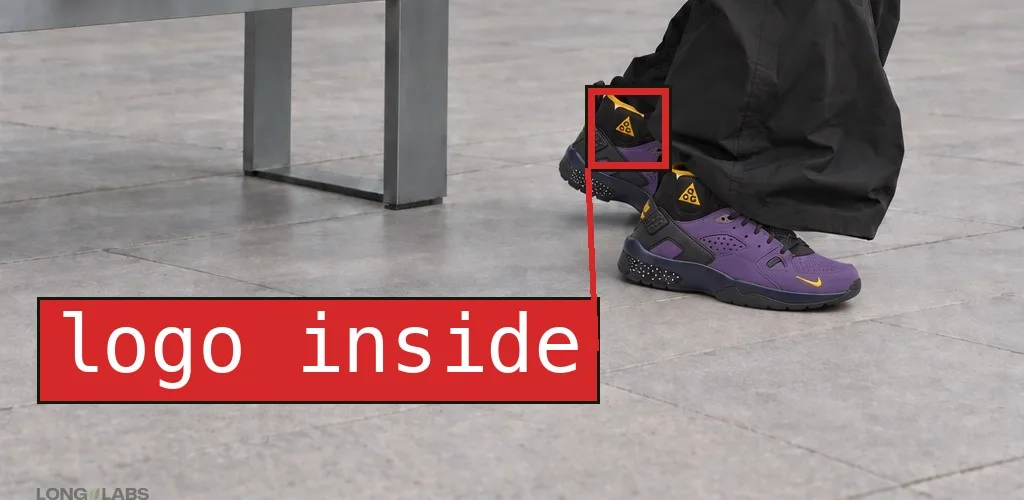
That is where QA earns its keep. Neither shot goes out, both go back with the reason written on them:
| Step | What happens |
|---|---|
| Make | The prompt, the parts list and photos of the real shoe. |
| Check | Every part up close, next to the real shoe. Software does the counting. |
| A person approves | A last look at every shot before it goes out. Here it caught the logo on the inner side. |
| Send back | FLAG with the reason, here: another shoe on the right foot, a logo on the inner side. |
| Make again | PASS only when every part passes the check and the person again. |
A prompt gets you close. A check catches the rest.
How we check AI product images now
The process fits on a card. None of it is clever, it just doesn't skip a step.
1. Photograph the real product from every side, plus close-ups of every small detail.
2. Write the fact sheet: every part, where it sits relative to another part, every count with its counting rule, every text letter by letter.
3. Generate with all photos attached and the risky parts written into the prompt.
4. Check each part on a tight crop next to the real photo. Counts: a pixel counter first, then a model, then a person when they disagree.
5. Fix one thing at a time on a crop at four times the size, then put it back into the full image.
6. Check again. Hidden or blurry is unsure, never a pass.
The prompt we used, as a template. Attach the photos from every side, then fill in your shoe. It fixes placement. Counts and small text it doesn't fix on its own, those still need the check:
The reference photos show the [shoe] from every side plus close-ups of every detail. Copy it exactly, do not redesign:
1. [Main logo]: [colour, size], on [which side and part]. Nowhere else.
2. [Second logo or badge]: on [its part]. Not on [where AI puts it].
3. [Tabs or straps]: [how many], [flat or rope].
4. Eyelets: exactly [number] per side.
5. [Holes or dots]: exactly [number] in [rows].
6. A left shoe and a right shoe, mirror images.
No extra logos, no changed colours.
And the issue-finder prompt we use as a second pair of eyes. Real photos first, the AI image last. On our 8 test images it caught 4 of the 5 planted mistakes. It missed the removed heel dot, so treat its answer as a list of places to look:
I attach photos of a real shoe and one AI image of the same shoe. The LAST image is the AI image. All other images are real photos.
Shoe type: [your shoe type, for example casual lace-up sneaker].

Find every place where the AI image does not match the real shoe. Work in this order:
1. From the real photos, list every part a buyer could check: each logo and the side it sits on, every badge or label and its exact text, everything you can count (eyelets, holes, dots, studs, straps, hooks) and how it is arranged, the sole, the heel, the material, the pair (one left, one right).
2. Find each part in the AI image. Look at that region up close in both images side by side, not at the whole picture.
3. Counts: count in the real photo and in the AI image separately, one item at a time, row by row. Do not decide in advance what the number should be. Then check the pattern spot by spot: for every position in the real pattern, is there an item in the same spot in the AI image? An empty, flat or smeared spot is a FAIL. If you cannot see every item clearly, the answer is UNSURE.
4. Text and logos: for each letter, first describe its strokes in the real photo (closed bowl, stem, tail, bar), then the same letter in the AI image. A missing stroke, a letter that turned into another letter, or a smeared letter is a FAIL. A logo that is missing, moved or added is a FAIL. If the letters are too small to describe stroke by stroke, the answer is UNSURE, never PASS.
5. Then shape, material, pair, ground contact and toes if a foot shows.

Answer with one line per part:
part | where | real photo | AI image | PASS, FAIL or UNSURE | why
Only write PASS when you saw the part clearly and it matches. Hidden, blurry or too small to read is UNSURE, never PASS.
End with one line: VERDICT: FIX (any FAIL), CHECK BY EYE (any UNSURE) or LOOKS RIGHT. Then list what a person still has to check by eye.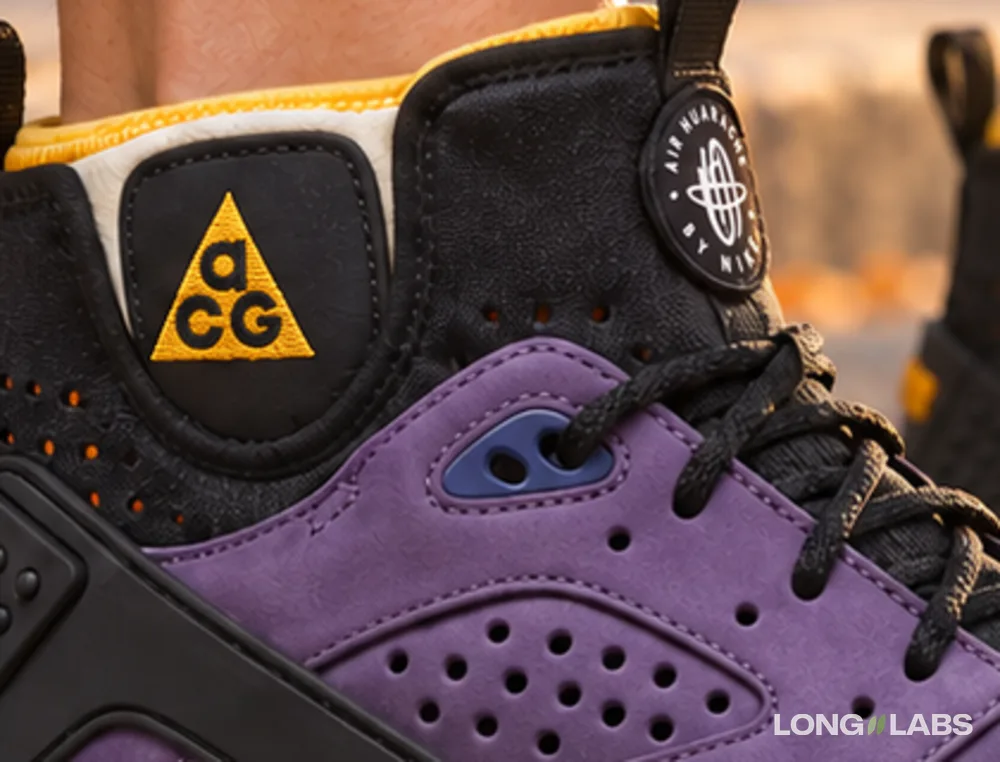
Limits of this test
- One shoe, one framing, one person checking. It shows where AI shoe images break and how we fix them, not how often they break.
- The benchmark is 8 images with 5 planted mistakes, one run each. Read the percentages as a direction, not as rates.
- The fact sheet grew between rounds (12, 16, then 17 points), so the round scores are visible checks of that round, not one fixed test.
- Two of the 17 points are hidden at the final angle. They are unsure, not passed.
- The campaign check covers 3 shots, by eye. With the shoe that small, a hole count can't be checked at all, only logos, shape and the pair. The check missed one of the two flagged shots; the person caught it.
- One hole was cloned by hand. A prompt alone did not get there. Colour under other light, material and fit can't be checked on an image at all.
How it works
- Product
- one purple mid-top sneaker, our own pair is the truth
- References
- 9 product photos of the brand, used locally, not published
- Date
- 2026-10-22
- How it is judged
- each part on a tight crop next to the real photo, by eye; a pixel counter and vision models as helpers
FAQ
Can I just write the counts into the prompt?
Yes, always write them in. But in our runs counts still came out one off, at five eyelets as well as at fifteen holes. Count every image by eye.
Why not let a vision model do the checking?
Out of the box it doesn't see every detail. In our test one run on the whole image approved 6 of 13 broken parts. Give it the fact sheet and tight crops, put a pixel counter next to it and let a person decide when they disagree.
Do I need photos of the real product?
Yes, from every side. With three photos and no straight side view, the logo ended up on the wrong part of the shoe.
Does this work for products other than shoes?
The method is the same for anything with parts you can count or read: buttons, stitching, a bag's hardware, the arms of a sofa. So far we have only measured it on this shoe.